Written by Explore Digital
The past year has been full of launches, audits, fixes, and client breakthroughs here at Explore Digital. Some of our discoveries were expected, some surprising, and a few instantly changed the way we build and market.
From faster site builds to Google Ads wins to accessibility surprises, each project showed us something useful that any growing business can apply.
Think of this post as a shortcut to those lessons so you can see what might apply to your own website and campaigns.
TL;DR. What 2025 Taught Us.
A few simple truths showed up across very different clients.
- Faster builds are possible when your tools and process are dialed in
- Small marketing changes can unlock big gains when the foundations are solid
- Many “marketing problems” are really process problems in disguise
- Accessibility and UX are not optional if you want your site to work for real people
If you take nothing else from this post, take this:
You don’t need more noise. You need a site and a marketing system that are clear, trackable, and built around how your customers actually behave.
If you could use a hand applying any of this to your own business—whether it’s tightening your website, improving conversions, or finally getting clear reporting—you can connect with us anytime. We’re always happy to take a look and point you in the right direction.
Website Builds That Got Faster, Smarter And More User-Driven
On the web design side, this year was all about building smarter, not just bigger.
How Divi 5 Helped Us Move Faster
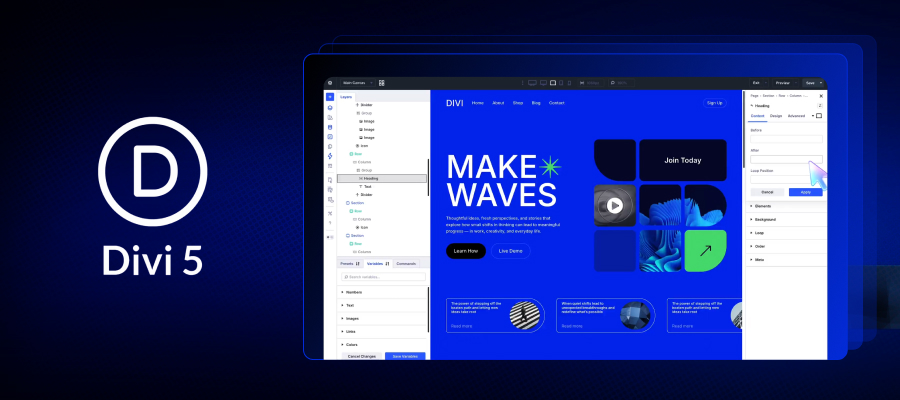
We rebuilt several sites using Divi 5, which WordPress developer Elegant Themes rebuilt “from the ground up.” That matters because a faster, smoother builder experience changes how quickly we can iterate on real client feedback. Divi AI features like section generation (creating on-brand sections based on the site’s existing content) and code generation can speed up the “blank page” parts of a build. Divi 5’s builder performance improvements also reduce the usual friction of making changes and QAing them.
A Professional Services Relaunch That Needed Clarity and Speed
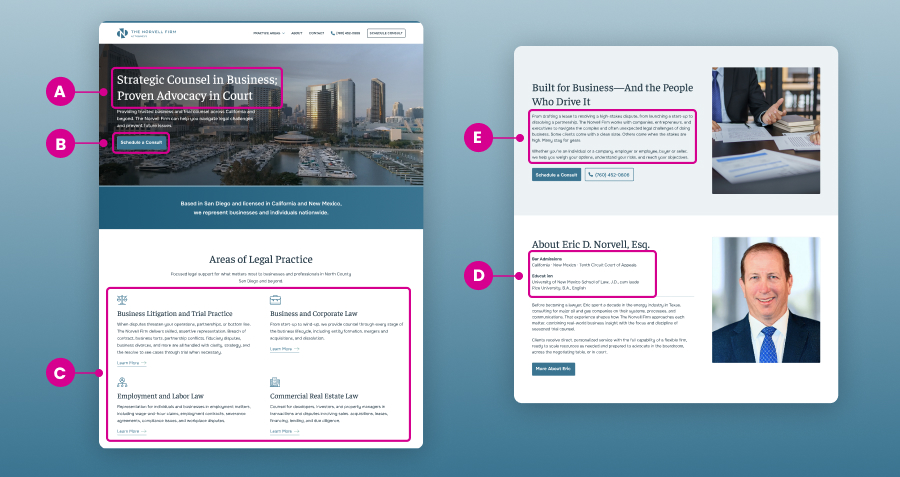
A good example is a business and trial law firm site we rebuilt using Divi 5. The goal was to make the site instantly understandable, reassuring, and easy to act on.
Here are a few of the redesigns we made that helped:
- A clear, direct positioning statement right away, so visitors know what the firm does without guessing.
- One primary call-to-action repeated consistently (“Schedule a Consult”), plus an always-visible phone number. That’s a simple way to reduce decision fatigue.
- Practice areas organized in plain language and supported by dedicated pages (for example, Business Litigation & Trial Practice). That helps both usability and findability.
- Credibility details that are easy to scan, like bar admissions and education, without burying them in a wall of text.
- Reassurance language that sets expectations (including a clear site disclaimer). That’s especially important in high-trust industries.
None of this is flashy, and that’s the point. It’s a site that’s meant to reduce friction and help the right visitor take the next step.
Faster UX Audits with AI-Assisted Behavior Tools
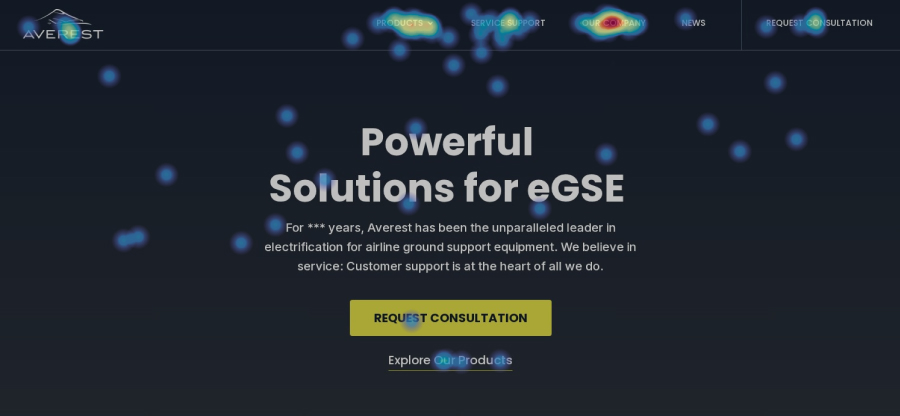
We also leaned more heavily on heatmap and behavior tools (like Hotjar) to make UX decisions based on what people do, not what we assume. Hotjar’s newer AI-assisted features, like automated summaries and tools designed to surface blockers faster, help us move through analysis more quickly, especially when we’re reviewing lots of sessions or pages.
Instead of guessing what users wanted, we watched where they clicked, scrolled, and stalled out. In some cases, we found entire sections of the website where people were skipping. In other parts of the website, we watched users get lost while they hunted for information that was buried too far down the page.
The big lesson: when the right tools reduce busywork, we can spend more time on the high-value work, like prioritizing fixes, tightening messaging, simplifying pathways, and making pages easier to use.
Small Marketing Levers That Created Big Wins

On the marketing side, a few “small” changes created meaningful momentum. The common thread was confidence and knowing when it was smart to pull a lever.
Strategic Scaling: Raising Ad Budget At the Right Time
One client, a local service business, increased their Google Ads budget in a high-demand season. That wasn’t a random “spend more and hope” move. We got there by doing the prep work first:
- Campaign structure was already clean and intentional
- Landing pages had clear calls-to-action and matched search intent
- Tracking and lead flow were stable enough to read results without guessing
Once we saw the right baseline performance, we helped the client feel confident increasing spend because it was a strategic next step, not a gamble. In that situation, the added budget gave the campaigns breathing room to work. It let the client’s ads show up more often for the right searches, stay visible during peak hours, and capture demand their old budget was leaving on the table.
Strategic Tracking: Fixing the “Weird Numbers” Problem
We also ran into a familiar headache with tracking links. Another client was seeing numbers in reports that didn’t match what was happening in real life.
After digging in, we found broken or missing UTM tags on some key links. Leads were coming in, but the source data was getting blurred. If your tracking links are not fully fleshed-out on as many source channels as possible, your reporting is going to be murky, and that makes smart marketing decisions a lot harder.
Adding the UTM tags was simple, but the takeaway was big: clearer attribution makes it easier to decide what to keep, what to cut, and what to scale, all without relying on gut vibes.
Brick-and-Mortar Conversion: CTA Swapping
Then there was a brick and mortar client who swapped a basic “Call Now” button for a short quiz style intake.
Instead of asking visitors to phone the business on the spot, the site now invites them to answer a few quick questions and get tailored next steps.
That matters because a lot of people don’t want to call right away. They want to engage quickly, get oriented, and move forward when they’re ready. A short intake flow can meet them where they are and still move the conversation forward.
The Simple Pattern Across All of This
You don’t always need a “new strategy.” Sometimes you just need to adjust the right lever at the right time, after the foundation is stable enough to support it.
Budget, button copy, intake flow, tracking – these are all classic conversion rate optimization moves. If you want to see how we think about this across campaigns, you can read more about how we optimize for conversion rates.
When Clients Realize It’s Not Just Marketing. It’s Their Systems.

Another big theme this year: a lot of “marketing problems” turned out to actually be systems problems.
One growing business came to us asking for more leads. After a deeper look, we saw they were already getting a healthy amount of inbound interest.
The real issue was what happened after someone filled out a form:
- Leads sat in inboxes.
- Follow up was slow or inconsistent.
- There was no clear owner for responses.
No wonder it felt like marketing wasn’t working!
We helped them map a simple workflow:
- Who sees new leads first.
- How fast they respond.
- What happens if someone does not reply.
Nothing fancy. Just clear steps and basic accountability.
Lead quality didn’t change overnight, but lead handling got better, and that showed up where it counts: in booked jobs and closed deals.
Accessibility and UX Lessons You Don’t Want To Learn The Hard Way

Accessibility showed up again and again this year.
On one project, a brand with a strong orange-heavy palette learned that some of their favorite shades didn’t pass accessibility standards. Light text on orange buttons looked fine to the team, but failed basic contrast checks. That means some users would struggle to read calls to action or form labels. In a high-trust field like law or finance, that’s a potential legal risk, not just an aesthetic problem.
We also ran into:
- Content layouts that were visually pretty but hard to use.
- Text that looked stylish but was too small on mobile.
- Sections where key information sat below long hero images and sliders.
- Pages with no clear next step, so visitors had to guess what to do.
The lesson: UX isn’t just about how a site looks. It’s about how easy it is for someone with limited time, on a small screen, to find what they need and take action.
Accessibility isn’t a one time checklist either. Standards change. Devices change. Your content changes. If you ignore it, you’re choosing a worse experience for real people—and you’re also creating avoidable risk.
The 2026 Goal is Simple
Across all these projects, the theme is clear:
When the fundamentals are solid, and we’re using the right tools (including AI in the places it actually helps), we can do more work faster, all without turning your marketing into a chaotic experiment.
If you want help tightening your website, improving conversions, getting tracking cleaned up, or building a marketing system you can actually trust, book a strategy call with us.
Frequently Asked Questions
1. What industries does Explore Digital work with?
We’re a full-service digital marketing agency offering comprehensive marketing services. We partner with service providers, law firms, ecommerce brands, creatives, wellness companies, home services, trades, and more. If your website and online marketing play a role in driving leads or sales, we can usually help.
2. How long does a website redesign project take?
Most website design and development projects take 8-12 weeks. Timelines depend on content readiness, site complexity, integrations, and how quickly feedback is approved. Clear scope and organized content typically shorten build time. If we’re rebuilding on an existing platform, we can often chart a timeline that fits your reality.
3. Can small marketing changes really increase leads?
They can. A clearer CTA, better intake flow, a landing page tweak, a budget change (at the right time), or implementing focused conversion rate optimization (CRO) tactics can shift conversion rate and lead quality. The key is making changes based on evidence: tracking, UX data, and what your customers actually do.
4. Why is website accessibility important for SEO and compliance?
Accessibility affects usability for real people, and it often overlaps with good UX and clearer structure. Color contrast, font size, forms, and layout all play a role in whether someone can use your site without friction. Strong search engine optimization (SEO) practices also ensure your site structure, headings, and content are accessible to both users and search engines.
5. What does a digital marketing audit include?
Audits help us find friction points your team usually can’t see from the inside, like dead clicks, confusing layout, scroll drop-offs, unclear CTAs, slow pages, or broken tracking. Our custom marketing strategy process, including behavior data and AI-assisted analysis where it speeds things up, helps identify gaps in messaging and lead flow so businesses can prioritize improvements with the highest ROI.
6. Why should SMBs prioritize mobile optimization?
Yes. For most small and midsize businesses, mobile traffic equals or exceeds desktop traffic. If your mobile experience is frustrating, you’re leaking conversions even if your desktop site looks great. Strong website services ensure your site performs seamlessly across all devices, not just desktop.
7. What are UTM tags, and why do they matter?
UTM tags are tracking parameters added to URLs to measure traffic sources accurately. And they do matter, especially if you’re running Google Ads, paid social, email campaigns, or any multi-channel marketing. Without consistent UTM tracking, your reporting gets muddy fast, and it’s harder to scale what’s working with confidence. Clean reporting is critical for effective paid search advertising and making confident budget decisions.
8. Can marketing problems actually be workflow problems?
Often, yes. Many businesses generate leads but lose them due to slow follow-up or unclear ownership. Marketing only works when your internal systems can support the traffic and leads it creates. Aligning marketing with internal systems strengthens your overall digital marketing mix and improves close rates. We can help you map a simple, realistic workflow so leads don’t sit, follow-up doesn’t slip, and reporting matches reality.
9. How does Explore Digital use AI in marketing?
We actively test AI tools inside the platforms we use for audits, UX reviews, and reporting. The goal isn’t novelty. It’s speed and coverage, using AI where it helps us move faster, while keeping decisions grounded in human strategy and experience. You can read more about our thinking in Generative Engine Optimization (GEO) for AI search.
10. Does Explore Digital work with businesses outside San Diego?
Yep. We work with businesses locally, regionally, and nationally. We love working with San Diego teams, but we’re not limited to one city.
11. What services does Explore Digital offer?
Explore Digital provides full-service digital marketing, including search engine optimization (SEO), paid search advertising, social advertising, website strategy, and performance reporting. Our focus is on building measurable marketing systems that drive consistent growth.
12. How do I know if my website needs a redesign?
Common signs include declining conversions, slow load times, unclear messaging, poor mobile performance, outdated design, or difficulty updating content. Reviewing recent launches and improvements in our recent client wins can help you see what a modern, performance-focused website should deliver.